Namespaces
Your tenant’s users and technical clients have access to namespaces to allocate your Aspect Models.
A namespace allows a clear association of Aspect Models — which can be named arbitrarily — to a scope. As every Aspect Model must be assigned to a namespace and namespaces can have subsections, namespaces help organize Aspect Models.
The namespaces on your tenant
To see a list of the currently activated (aka "whitelisted") namespaces for your tenant, proceed as follows:
-
Click your account and tenant information at the upper right of the screen.
-
Select Whitelisted namespaces.
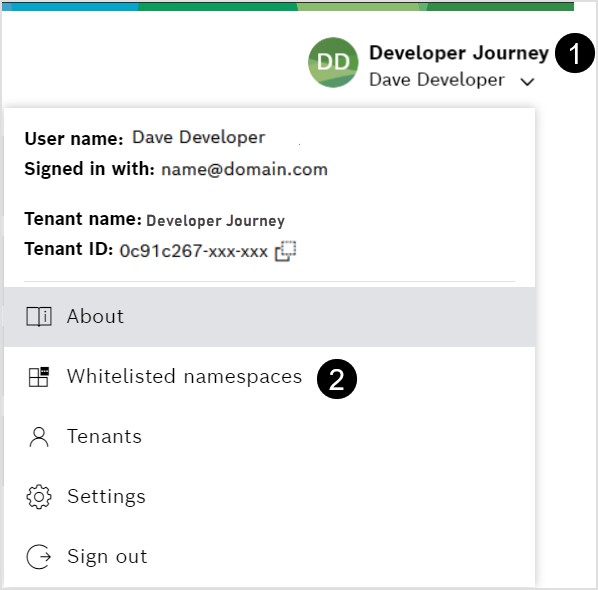
Claim (whitelist) a new namespace for your tenant
To claim and assign one or more namespaces for your tenant, email support.semantic-stack@bosch.com.
Please be aware that namespaces are designed to be universally unique. Therefore, only namespaces that are available
and do not contain registered names of other parties will be approved (e.g. you can not claim com.google if you are not Google).
For example, Acme Corporation can request the namespace prefix com.acme-corporation.
Once assigned to your tenant, this prefix also covers sub-namespace prefixes such as com.acme-corporation.domain_a and com.acme-corporation.domain_a.topic_b, you do not need to request them separately. Nesting is not restricted.
Find more details in the section Naming rules for your namespaces below.
|
Click the following link to find a prepared email with placeholders for all required content support.semantic-stack@bosch.com |
Hello Bosch Semantic Stack team,
I would like to claim one or multiple namespaces and have them assigned to my tenant for usage in the Aspect Model Catalog.
Tenant ID: insert your tenant ID here
Desired namespace: list the namespaces here
Naming rules for your namespaces
-
A namespace is given in Reverse Domain Name Notation
 .
-
All characters are in lowercase.
-
It is composed of minimum two parts separated by a dot (.)
-
It must be clear that the domain (below the TLD) belongs to you,
e.g. from your email address or from the homepage on the internet. -
Plausible exceptions can be made upon request.
Folder structure of namespaces
Namespaces are visualized in the Aspect Model Catalog, but they also can be uploaded/downloaded as ZIP packages. Each namespace package has the following standard folder structure:
ZIP folder/
├─ namespace/
│ ├─ 1.0.0/
│ │ ├─ AspectModel.ttl
│ ├─ 1.1.0/
│ │ ├─ AspectModel.ttl
│ ├─ 2.0.0/
│ │ ├─ AspectModel.ttl
├─ dependency namespace/
│ ├─ 1.0.0/
│ │ ├─ AspectModel.ttl
│ ├─ 2.0.0/
│ │ ├─ AspectModel.ttl
├─ dependency namespace/
│ ├─ 1.0.0/
│ │ ├─ AspectModel.ttl
As shown above, dependancies are also displayed in the folder structure of a namespace. A dependency is a namespace that is dependent on the main namespace, containing references to it. You can look up dependencies in the Aspect Model Catalog UI in the Details Page of a namespace.
